Why We Designed Garde, a DIY & Recipe App

Peace Akinwale is a B2B SaaS content writer and strategist who specializes in bottom-of-funnel content. Over six years, he's grown a client's organic traffic by 233% (by prioritizing BOFU comparison content and long-tail keywords), contributed to a team that increased an HR tech company's traffic from 3k to 16k monthly visitors, and built AI-powered editorial workflows using Claude Code to improve content quality at scale. He's also co-founding UseGarde, a product that turns instructional videos into searchable text guides. Works best in environments that value serious work and chitchats to promote camaraderie.
If you're anything like my wife, you recreate food recipes you see on TikTok or Instagram. & If you're a DIY enthusiast, you likely save videos like this outdoor chair by Handyman or even this mirror frame decor.
You're the reason why I developed Garde.
Garde is an app that turns any how-to videos into text. This way, whenever you want to recreate that activity or food you saw & loved from TikTok, IG or YouTube, you can open the Garde app, paste the link, & see the step-by-step instructions from there.
The solution we solve is simple: Garde helps you avoid scrolling through your saved pages on TikTok, especially when you're at the grocery store & are trying to buy the ingredients for the Mediterranean gazpacho soup Ramsey Gordon made.
How Garde, the DIY & Recipe Keeper App, Works
You find a recipe or activity you want to recreate, simply copy the link, open the recipe app, & paste your link.
In about 1-2 minutes, Garde will process the video & extract everything you need: a complete list of ingredients with exact measurements & step-by-step instructions you can actually follow. It'll look like this:
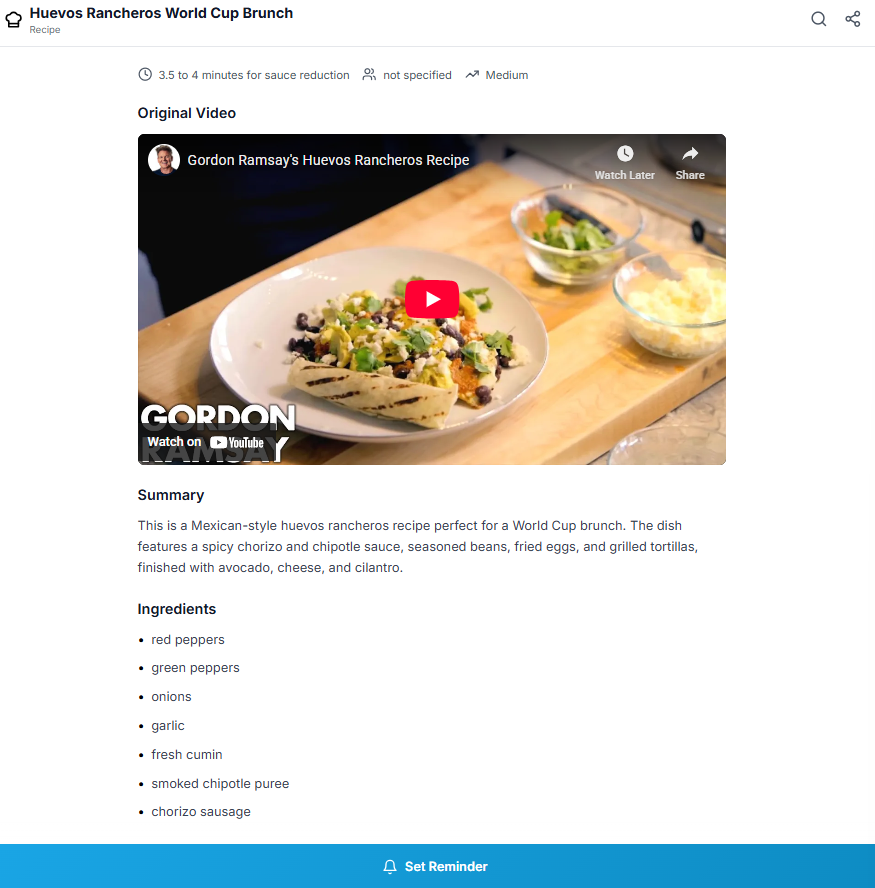
Continues below:
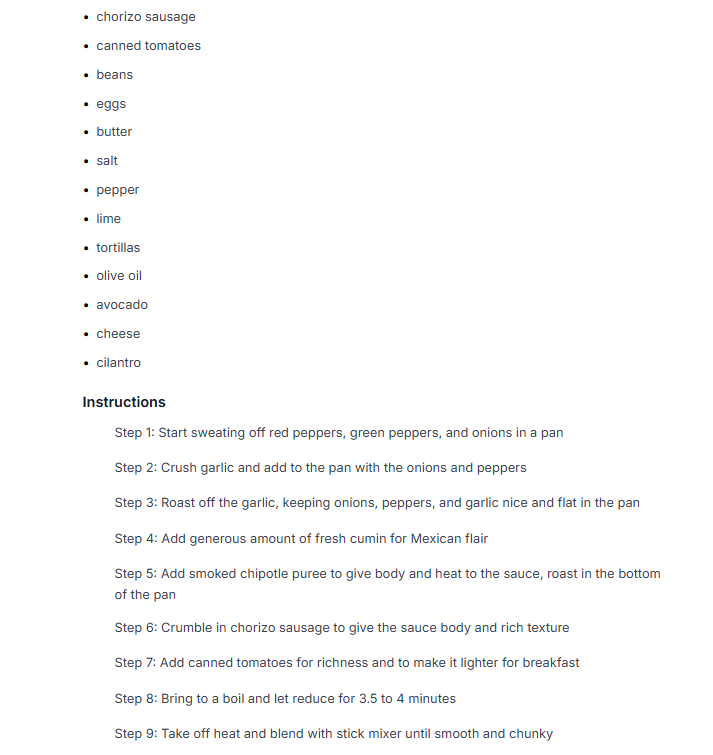
& ends here:
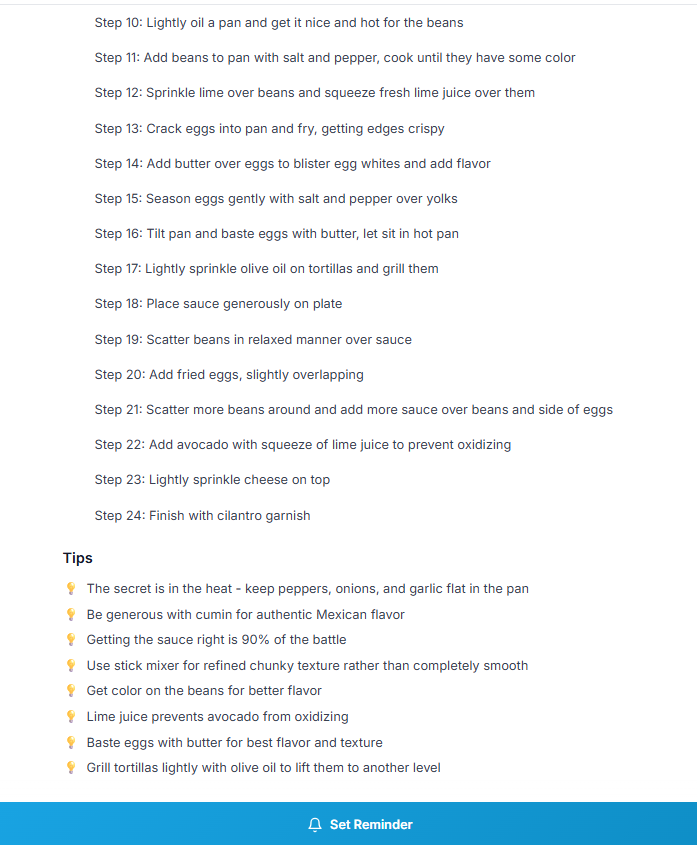
You can compare Garde’s accuracy with the actual video from Gordon Ramsey:
If you’re wondering how Garde compares to one of the most popular alternatives, see image below:

Garde’s recipe app is on the left, & we obviously pay more attention to detail than one of the leading recipe apps in the category.
What this means:
The same video that would have you pausing & rewinding in the kitchen is now a clean Google-Keep-looking text you can glance at while cooking.
The beauty of Garde is that you've already watched the video.
You know what the dish or activity should look like, a mental picture of how it comes together. You just need the text as a reference - to confirm measurements, check the next step, & make sure you didn't miss anything.
& That's why about a thousand people already use Garde via the web app to save their instructional videos & read from it when they're ready to “cook.”
A Few Features of Garde that Makes your $5.99 Worth It
Garde is $5.99/m & 59.99/year for now, & here are a few features that makes it worth it:
1. The Shopping List Feature
The recipe app helps you automatically pull out ingredients from each recipe card. This means you can automatically create a shopping list from each recipe you saved.
Where it becomes genuinely useful for my wife is that you can generate a shopping list that combines multiple recipes at once.
For context, say you saved three recipes on Sunday. You head to your meal planner & slot a Mediterranean chicken recipe for Tuesday, beef tacos for Thursday, & stuffed peppers for Saturday.
You can combine the ingredients from these three recipe cards so you can use it as your ultimate grocery list for the week.

You can then check the items you have in your house off, & only check the rest of the unavailable items as you shop.
This way, you're not watching that recipe video all over again when you get to the mall like my wife really did, especially when she forgot her cooking notebook. You'd be using Garde’s recipe app as your ultimate shopping list.
2. The Meal Planner
As a three months old couple, & like every other couple, we often run out of food ideas for breakfast or dinner. You probably get tired of worrying about what to eat too.
As I write this blog on my couch, my wife has asked me what to eat for dinner twice.
& Like every other time since I added the AI Recipe Maker feature to Garde, I've pointed her to the feature. “Tell it what we have & it'll generate three food ideas for us.” But this is another feature entirely (see point 5).
The Meal Planner, in essence, helps you plan your week (or day) through a food calendar.

With it, you can slot each recipe into the days of the week you want Garde to assist you in the kitchen. For example, if you intend to make that burger recipe on a Sunday afternoon, you can add it to the Sunday lunch slot.
& if you found a snack idea for Saturday, you can add it to the snack box for Saturday. I currently have two snack ideas for Wednesday & Saturday as at the time of writing.
This way, the Meal Planner is your partner in the kitchen, & this makes sense for families of all sizes.
3. Reminder feature:
You may want to take action on some of your ingredients before you actually cook.
For example, you may need to prep one of your ingredients before you cook. With Garde recipe app, you can hit the reminder button & write “marinate the chicken two hours before cooking.”

Some recipes even require you to marinate some ingredients overnight. The reminder feature comes in handy so you know when to get up & prep your meal for the next day.
4. AI Recipe Maker
The AI Recipe Maker is for days you don't have any food ideas. You can use it to generate quick recipes & prepare it anytime you're chanced, exactly what you'd do if you saved the recipe directly from a TikTok IG video.
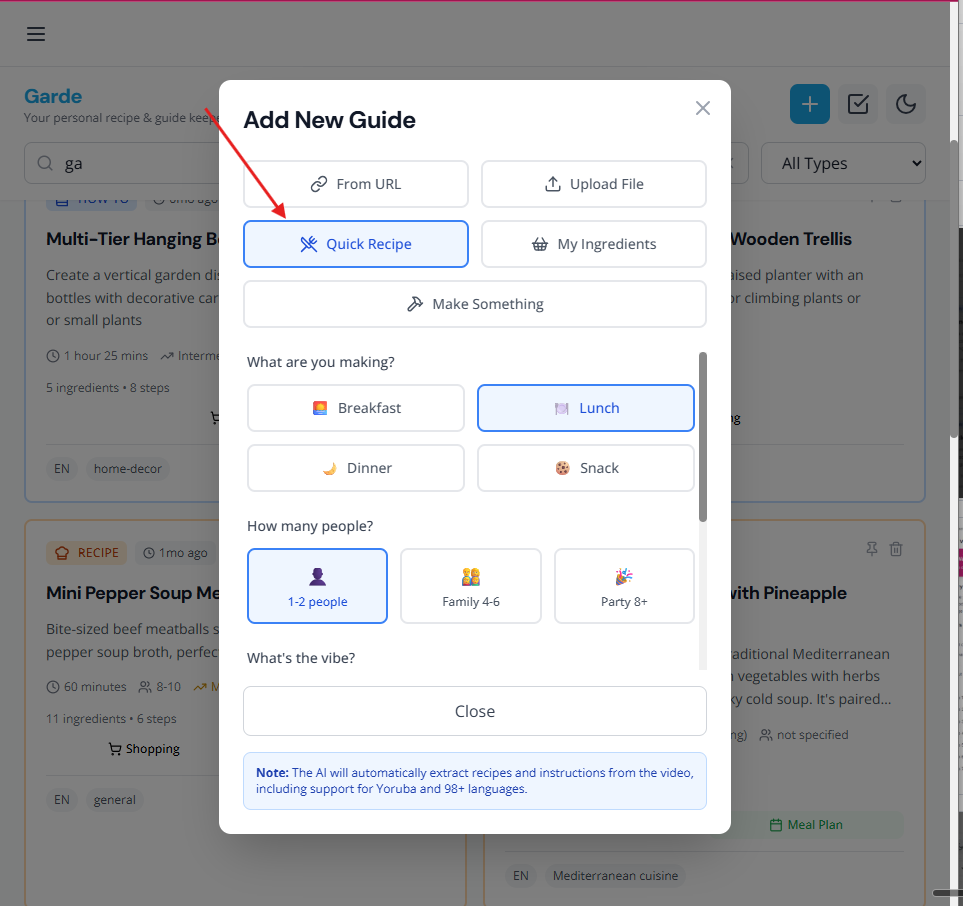
The spin here is that Garde personalizes every recipe idea.
You can specify your culinary preferences, including how much spice you want in your food, your nutritional goals (weight loss, bulking), & whether you want an American or Mexican dish.
The recipe app will also take inspiration from your recent 5-15 saved recipes. This way, it knows your “vibe”, & will provide three ideas that are so close to what you’d love to make.
5. Create Recipes from Your Available Ingredients
There are days you don't want a quick trip to the grocery store. You just want to cook with what you have in your pantry & fridge.
On days like this, the My Ingredients feature can come in handy.
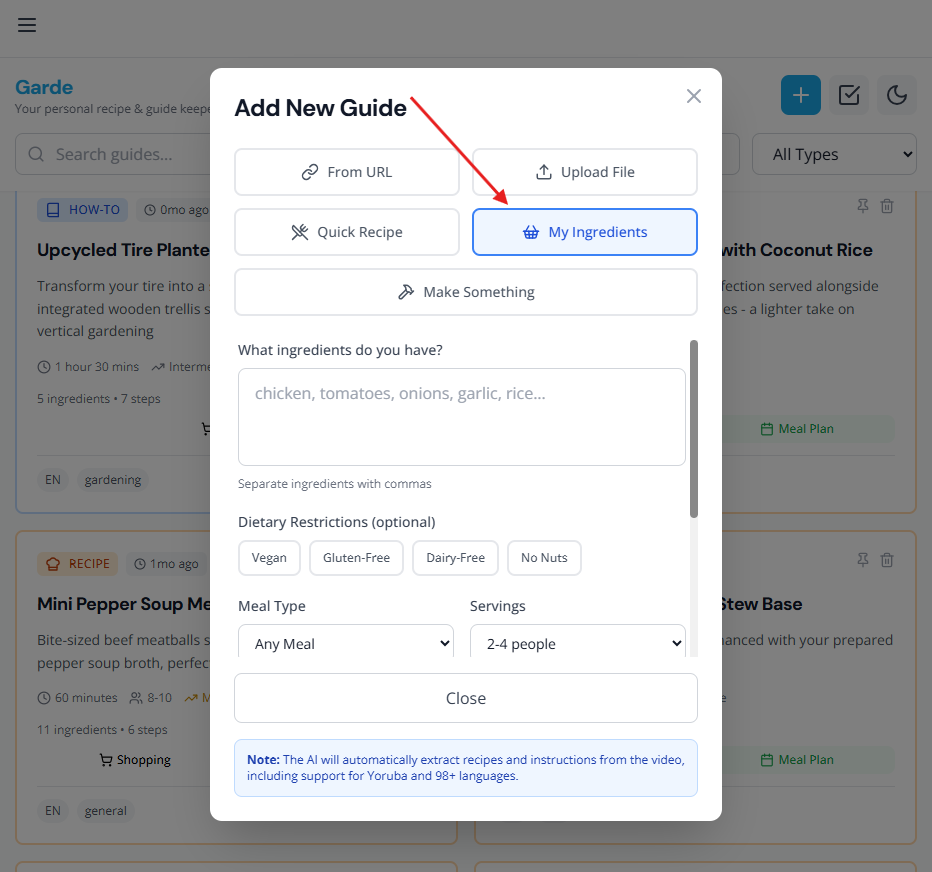
Let's say you only have rice, pepper & chicken in your house, our AI will recommend three meals for you & you'd choose one.
Again, our recommendations are based on your culinary preference, dietary needs, & context from 5-15 recent recipes you've saved. This helps Garde get as close as possible to recipes (or food ideas) you would actually enjoy. Here’s an example:
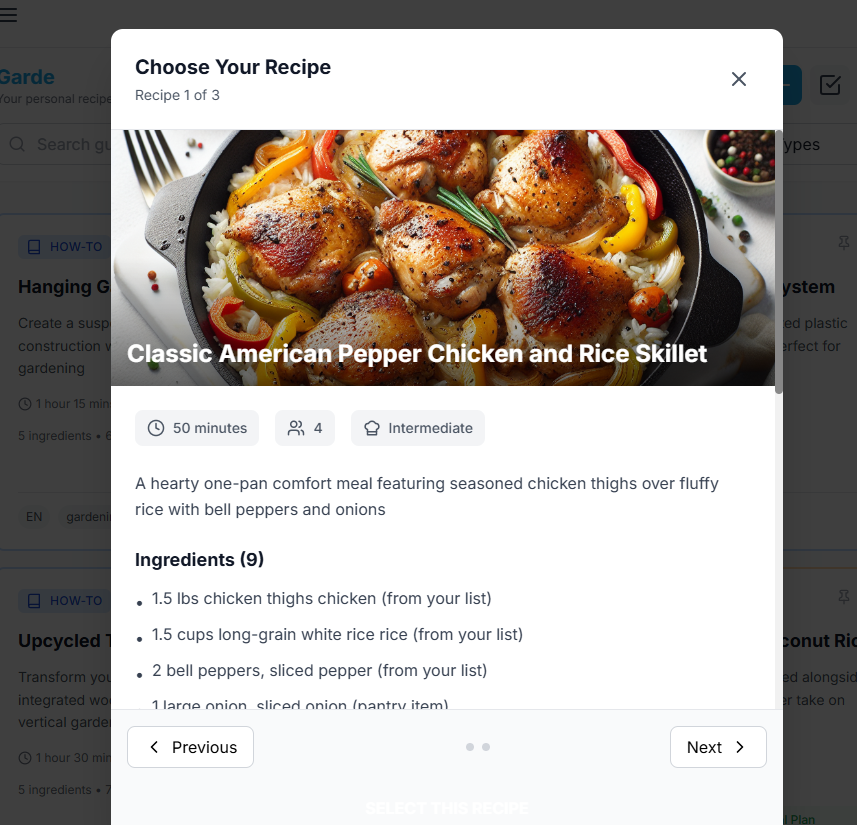
Second recommendation:
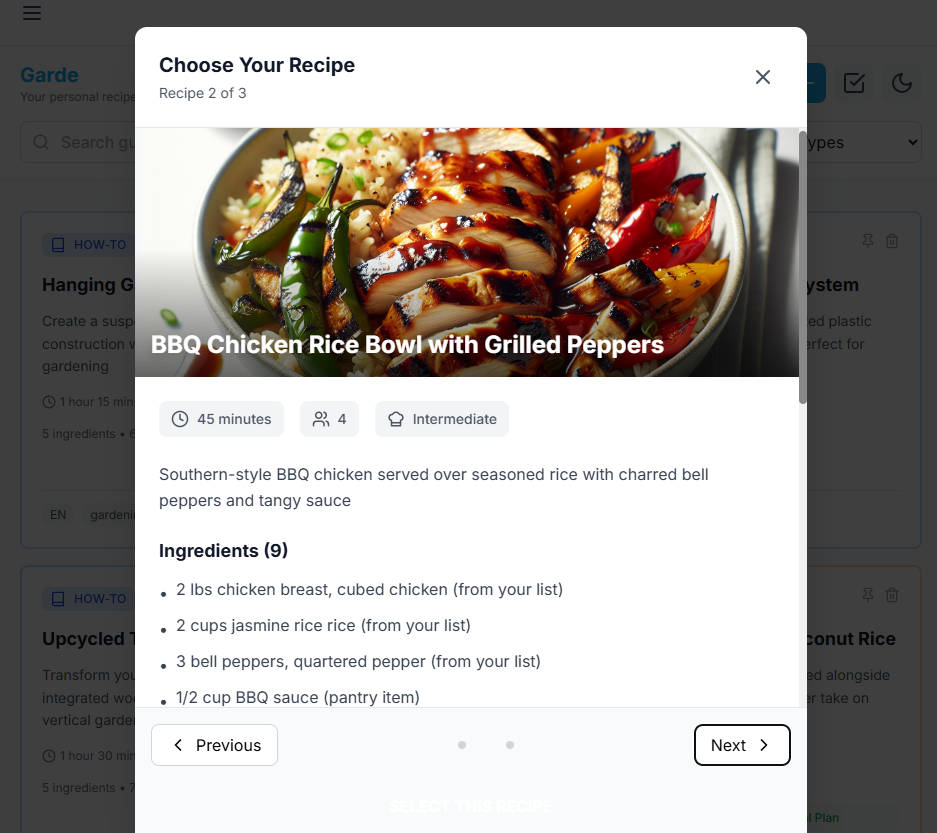
Third recommendation:
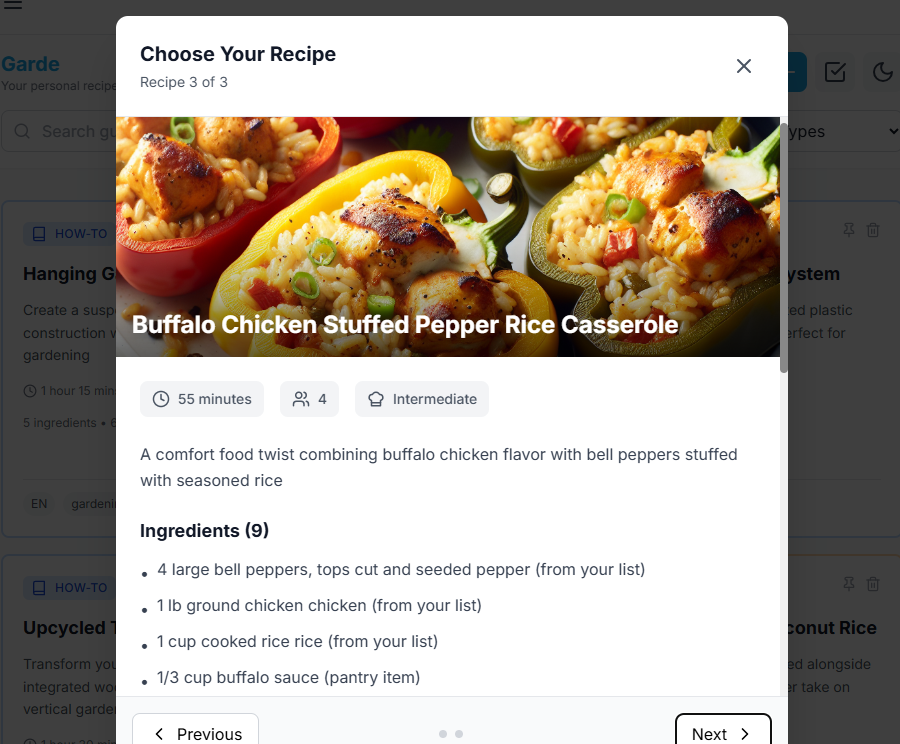
Looks cool, huh?
6. Activity Tab for DIY Projects
What I've explained in the Meal Planner, the same applies for the Activity Tab.
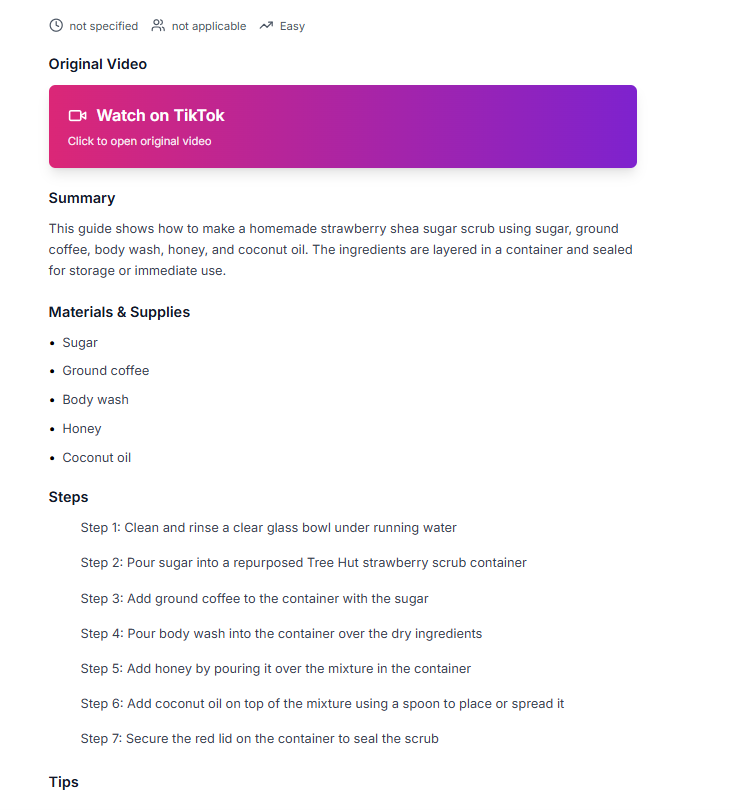
Garde recipe app also saves DIY videos, so if you saved a video tutorial on how to build an outdoor chair with an old tire, make a soap, or DIY body scrub, you can use the Activity Tab to plan the making process into particular days you want.
For example, this is an actual process for DIY body scrub. If you click on the link I just embedded, the creator didn’t say a word, but Garde still processed what you need accurately:
You can head to the activity tab & add it as an activity you want to execute:
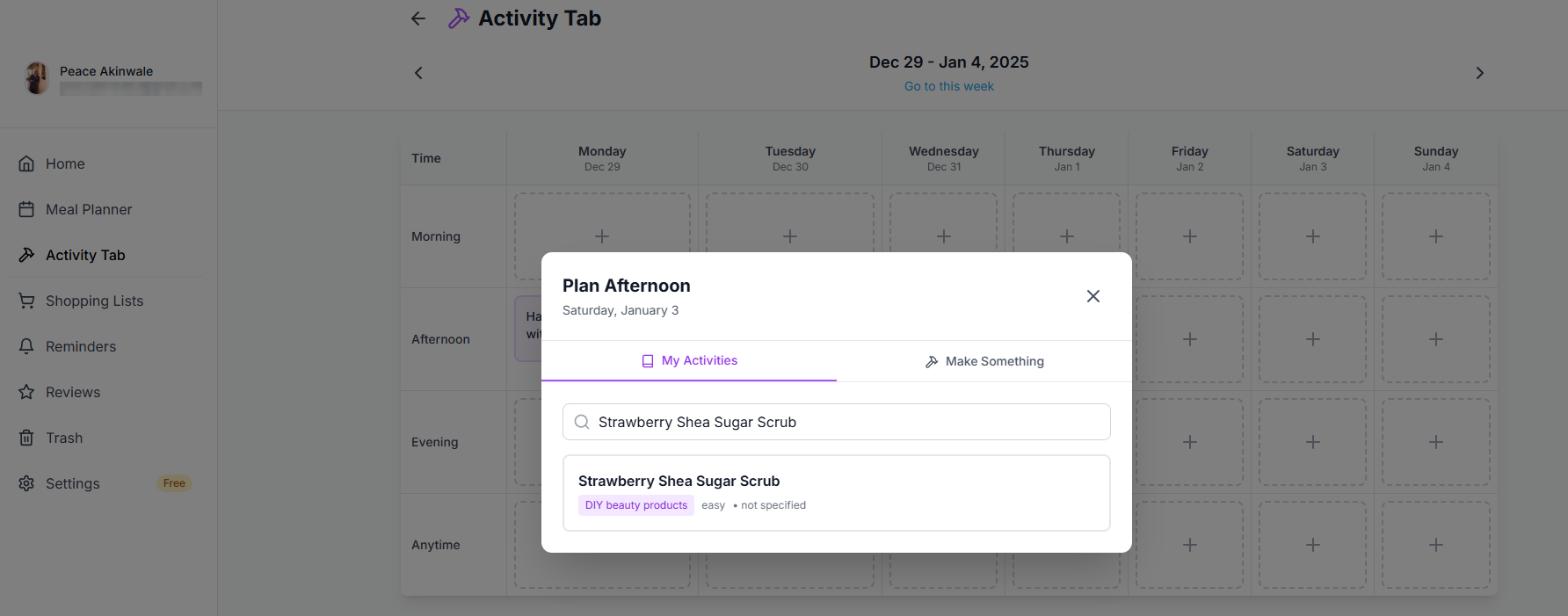
This way, you can plan DIY activities for your free days or weekends.
Each activity card you create will show you the complete list of materials you need & the step-by-step instructions you'll follow to replicate what you saw.
Closely tied to this is the ability to create an activity from what you have:
7. Make Something from Your Existing Materials/Supplies
If you have some materials for a home decor, you can write it in our “Make Something” tab & the DIY & recipe app will suggest three ideas you can make with your supplies.
You can use this activity generator to curate ideas on things to do for gardening, beauty & self care, DIY gift-making, etc. Here's what an example output looks like:
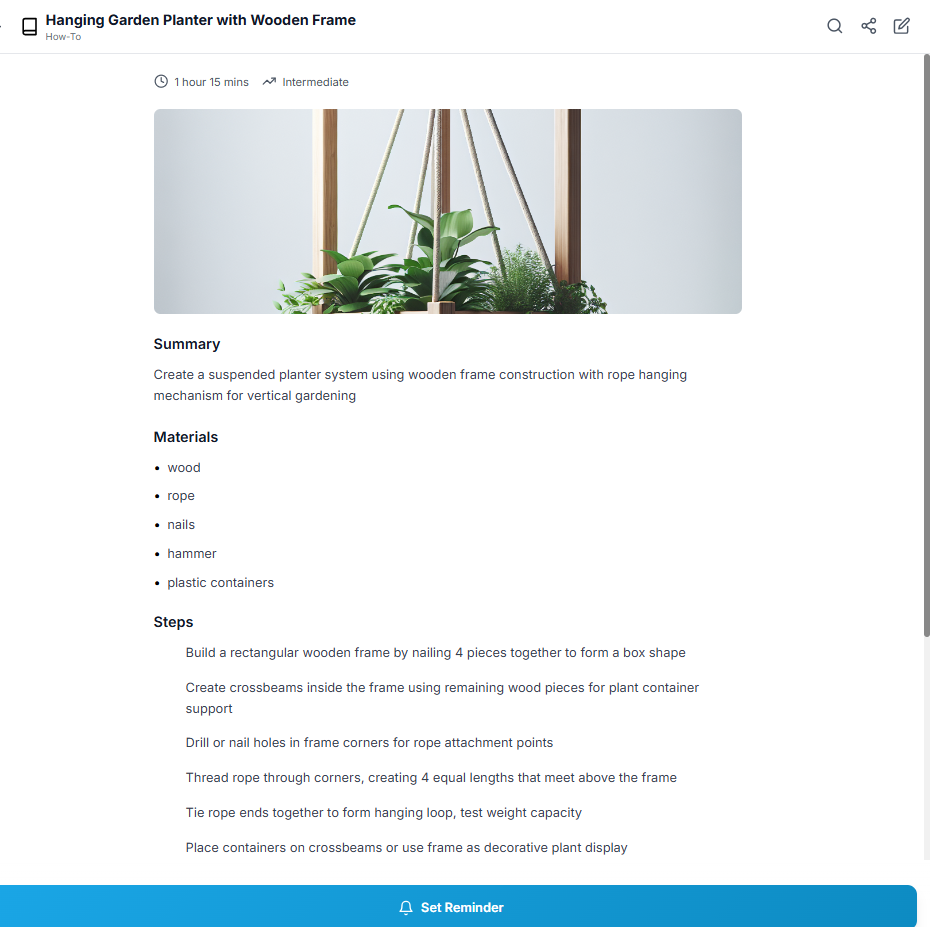
& with the Activity Tab, you can slot these AI-assisted ideas into a calendar-like schedule to keep yourself busy on the days you want to actually execute a project.
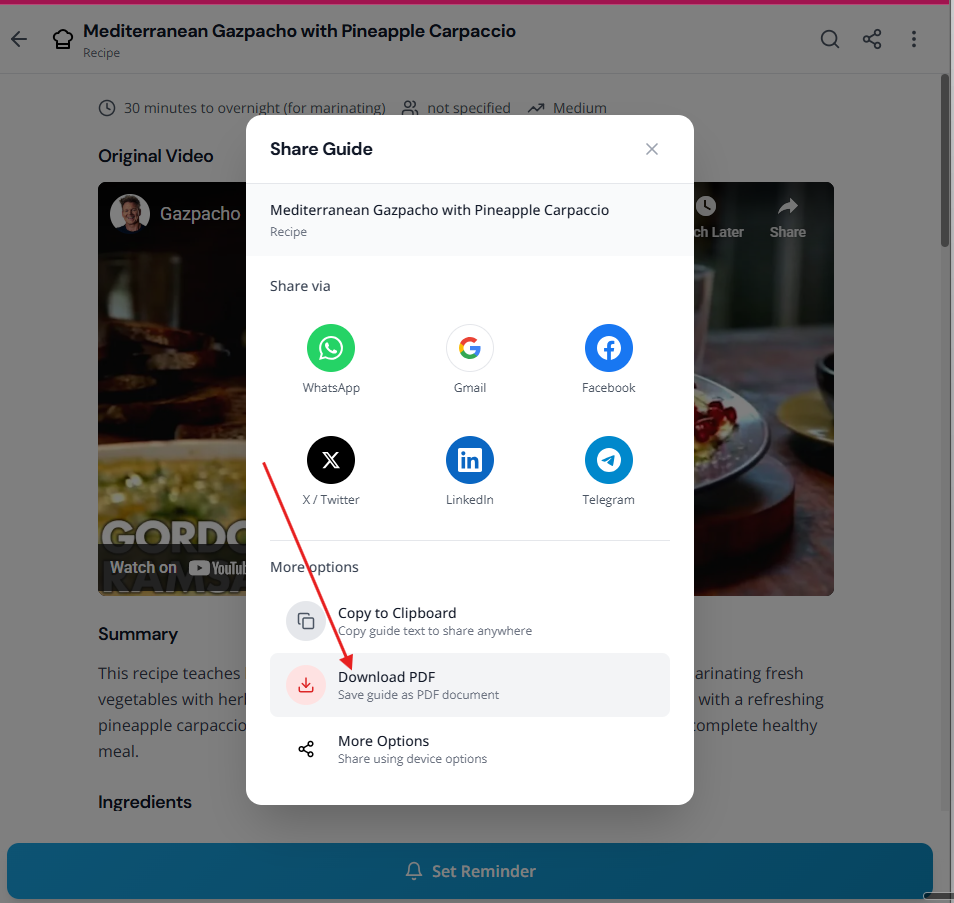
8. Export Each Card in PDF for Offline Access
Finally, you can export any recipe or how-to card you've extracted into PDFs. This is particularly helpful if you're not always connected to the internet & would need the step-by-step instructions while carrying out a project.
You can easily load the PDF on a tablet, prop it up on your workbench or kitchen window, & follow along.
How Garde’s Recipe App Changes Things
We're not promising more than we can deliver. & We know Garde cannot replace videos.
What I know, as an individual, is that when videos give us visual context of what to do, texts help us execute faster.
& with Garde, you don't need to write out your list of ingredients (or supplies needed for a project).
You definitely don't need to rewatch a video to find the ingredients (or supplies) mentioned or follow the steps the creator followed. Our DIY & recipe app can show you detailed instructions from your video, & you probably only need to extend your screen timeout time by 20 minutes so you won't have to smear your screen with flour, yogurt, or stain from whatever you're making.
So, Garde, in a bullet list, helps you:
Save videos as texts,
Use the texts to carry out the project you found,
Automatically create shopping lists,
Use AI to assist with recipe & activity ideas to recreate,
Plan your weekly meals through the calendar-based Meal Planner, &, among others
Set reminders for essential things like marinating your chicken two hours or more before making the peppered chicken recipe you saw online.
All these, have frankly helped my wife when we're shopping. & they have also helped out in the kitchen as well. I've watched her DIY Greek yogurt with this, & she has recreated really good recipes since the stress of pausing, rewinding, & being messy in the kitchen …
The CTA You Don't Want
Use Garde now. It's $5.99/month, $59,99/year.
You can start with a free trial to extract three videos.
So go ahead, copy the link to that recipe or DIY video you saved & paste it on Garde.
Our app has a success rate of 99.9%, which means very few videos will fail. But most videos are processed, & are accurately extracted.
Give it a shot & let me know how it works in the comment section. I’m waiting.
